

May 12, 2026 – athenaOne Workflow Quick Links
Have a workflow question or unsure how to complete a task in athenaOne? We’ve got you covered.
May 12, 2026 – athenaOne Device Management Module
If you encounter any alerts in athenaOne regarding your devices (scanners, printers, card readers, etc.), please follow the instructions below to install or configure the device(s):
1. Athena has Device Management modules that allow it to connect to the following devices:
•Fujistu document scanner
•DYMO label printer
•Ingenico credit card reader
•MidMark ECG machine
While your computer may recognize these devices, they will not function in Athena without these modules installed. Whenever you log into Athena on a new computer, they will need to be installed again. This can be done during your normal workflow.
2. When you attempt to use one of these devices, Athena will indicate that the device needs to be set up, as shown above. Click Set Up (Scanner, Label Printer, etc.) and you will be prompted to install the module.
3. Click Install Module. After a brief installation, you will immediately be able to use the device.
CLICK HERE to download these instructions with screenshots.
May 11, 2026 – athenaOne SSO Access
As a follow-up to the email sent on Friday, if you are not currently using Microsoft Edge as your browser, you can access the athenaOne SSO login page using the link below:
https://athenanet.athenahealth.com/1/1/login/startoidc.esp?IDP=0oazpacmxhL1DR2VN297
Please be sure to bookmark this link in your browser for easy access moving forward.
————————————————————–
For those who are currently using Microsoft Edge: The athenaOne link has now been added to your Microsoft Edge browser Favorites.
To access athenaOne:
- Open Microsoft Edge
- Select PMG Favorites in the top left corner
- Click athenaHealth SSO
May 8, 2026 – athenaOne Go-Live Reminder & Resources
Our athenaOne Go-Live is just days away! As we prepare for this exciting milestone, we want to sincerely thank everyone for the hard work, flexibility, and dedication you have shown throughout this transition process.
Click Below for Important Reminders and Resources for Our athenaOne Go-Live on Tuesday, May 12:
https://mailchi.mp/premiermedicalhv/important-athenaone-provider-go-live-information-4769473
May 7, 2026 – Important Provider Go-Live Information:
Click the link below for important Provider Go-Live information that was sent to Providers on 5/7/26:
https://mailchi.mp/09ef5dd1b935/important-athenaone-provider-go-live-information-4769471
May 4, 2026 Important Reminder: Proper Use of athenaOne Testing vs. Production Environments
As we move forward with Athena, please be reminded that no testing, practicing, or workflow validation should be done in the live (production) environment.
We understand that in Medent, testing in live was sometimes necessary. Athena is different. Athena provides a dedicated ClientTrain environment, which is the only approved place for testing, practice, and follow-along activities.
Please do not use the production environment for testing, even if:
- A chart appears to be a “test” patient, or
- Test/demo charts were accidentally brought over during conversion
The production environment is for real patient care only and should not be used for learning or experimentation.
✅ ClientTrain = practice and testing
🚫 Production = real patient care only
If you need help accessing ClientTrain or have questions about where to test a workflow, please reach out – we’re happy to assist.
For assistance, please contact:
Victor Juarez, LPN – Clinical Application Specialist I
📞 845.790.6136 | Ext. 36162
📧 vjuarez@premiermedicalhv.com
Thank you for your cooperation and for helping keep our live system accurate and safe!
May 1, 2026 Update: Click Below for the Recorded athenaOne Micro Training Sessions
Below are the links to recorded athenaOne Micro Training sessions:
MEDICAL ASSISTANT (MA) CHART PREP – CLICK HERE
This session is for Medical Assistants and other staff who will be responsible for chart preparation for providers in athena. The session will review why chart prep is needed, what items need to be pulled over, and the process for completing chart preparation in athena.
GAP DATA- APPOINTMENTS AND PATIENT REGISTRATION – CLICK HERE
This training is for staff participating in the gap support strategy. The session will cover how to move an appointment from Medent to athena and how to register a new patient.
TRANSITION OF CARE (TOC) – CLICK HERE
This session is for the TOC team. This session will review the TOC workflow in Athena.
CLINICAL TEAM- SCHEDULING – CLICK HERE
This session is for clinical team members who are also responsible for scheduling patients. The session will cover how to schedule and edit patient appointments in athena.
MEDICAL SECRETARY / OFFICE ASSISTANT – CLICK HERE
This session is for medical secretaries and office assistants who need additional clinical training, specifically on how to queue labs for providers and book procedures.
PATIENT SERVICE COORDINATORS (PSC) – CLICK HERE
This session is for Patient Service Coordinators (PSCs). The session will walk through the PSC workflow and will cover scheduling patients for procedures and monitoring the completion of presurgical testing. CLICK HERE
HOSPITAL CONSULTS – CLICK HERE
This session is for staff who coordinate hospital consults. Topics will include how to open a patient case to communicate consults to providers and how to use athenaText.
LAB ORDERS – CLICK HERE
This session is for clinical or non-clinical staff tasked to queue up or add orders to athena.
April 30, 2026: Patient Portal Transition
The current Medent Patient Portal will no longer be available beginning at 4:00 PM on Friday, May 8.
Patients attempting to access the Medent Portal after that time will receive instructions for setting up their new athenaOne Patient Portal.
Important Patient Portal Notes:
- Initially, the athenaOne Patient Portal will display only limited demographic information while full data migration is completed over the next 6–10 weeks.
- Patients requiring historical records during this transition period should contact their provider’s office directly for assistance.
Patients have already received communication regarding this transition, and signage has been installed throughout PMG offices and exam rooms directing patients to: www.PremierMedicalHV.com/athenaOne for additional information and FAQs.
April 29, 2026 Update: athenaOne Go-Live Support
During the April 29th PMG Virtual Town Hall Meeting, Deb Maietta (Director of Learning & Development) and Miguel Hernandez, CIO, presented the athenaOne Go Live Support Plan. CLICK HERE to view a copy of the Go-Live Support plan.
April 24, 2026 Update: athenaOne Virtual Micro Training Sessions available
The Project Beacon Team will be holding a series of athenaOne Virtual Micro Learning sessions the week of April 27th. Please check with your director/manager for available sessions. These sessions will also be recorded and posted to the Project Beacon Info page by Friday, May 1. If you have any questions, please contact Dee – Marketing x 10068 | dvolek@premiermedicalhv.com
April 20, 2026: athenaOne TeleHealth Provider User Guide
Below are links to the athenaOne Telehealth User Guide and Instructional video:
Provider athenaOne Telehealth Resources:
Demo Video: athenaTelehealth | User Guide — athenaTelehealth
April 12, 2026 Update: athenaOne In-Person, End User Training
In-Person, End User training sessions will be held April 14 – May. If you have not scheduled your training session, please contact Dee – Marketing x 10068 | dvolek@premiermedicalhv.com
March 23, 2026 Update: athenaOne Training Environment (Client Train) is LIVE!
The athenaOne Training Environment (Client Train) is now available for you to practice and apply what you’ve learned during your online training.
This environment is designed to mirror the live production system, including all of Premier’s departments, providers, and schedules – but with no real patients. It provides a safe space where you can practice key workflows such as scheduling, check-in, intake, and more without affecting real patient charts or appointment schedules.
The Training Environment also uses Single Sign-On (SSO), so no special login credentials are required.
Click below to access the athenaOne Training Environment:
https://clienttrain.athenahealth.com/1/1/login/startoidc.esp?IDP=0oazpacmxhL1DR2VN297
March 20, 2026 Update: Online Training must be completed by April 1st.
CLICK HERE for instructions on how to access your athenaOne Training.
🚨 RAFFLE ALERT! 🚨 Everyone who completes their online training by March 31st will be automatically entered into a raffle for a $100 Amazon Gift Card!
March 9, 2026 Update: WATCH the 3/9 Virtual Lunch & Learn: athenaOne Training Overview
If you missed the Virtual Lunch & Learn session onMarch 9th, you can watch it by clicking the link below:
March 3, 2026 Update: Virtual Lunch & Learn: athenaOne Training Overview – Monday, March 9th
Join us for a brief athenaOne Online Training overview and Q&A session. During this session, we will review the e-learning modules and answer any questions you may have.
Monday, March 9th | 12:15 PM – 12:45 PM
Microsoft Teams Meeting – Click to Join:
https://teams.microsoft.com/meet/21836748425427?p=VLQZpEPmwKJXUYJUpg
March 2, 2026 Update: athenaOne Online Training is LIVE! CLICK HERE for instructions on how to access the training.
February 10, 2026 Update: Check out the PMG Virtual Town Hall Meeting, including some important AthenaOne updates from the Project Beacon Team CLICK HERE
December 19, 2025 Update: Check Out the Second Issue of GoLive News!
CLICK HERE: Second Issue: Go Live News
December 8, 2025 Update: Training Weeks and Temporary PTO Guidance
Athena EMR Training Weeks & Temporary PTO Guidance – April–May 2026
Premier Medical Group will begin onsite Athena EMR training in April 2026, followed by Go-Live in May 2026. These weeks require full staffing support to ensure a smooth transition. PTO Requests are discouraged and may be denied during the following training and go-live periods based on operational needs:
-
April 14–17 – Training Week 1
-
April 21–24 – Training Week 2
-
May 5–8 – Training Week 3
-
May 12–15 – Go-Live Week 1
-
May 18–22 – Go-Live Week 2
Thank you for your flexibility and support as we prepare for Athena. Please contact your site director or supervisor with any questions.
December 1, 2025 Update: Check Out the First Issue of GoLive News!
CLICK HERE: First Issue: Go Live News
November 30, 2025 Update: Roadshow Dates Announced!
AthenaOne Roadshow dates announced! Find out where the Project Beacon team will be visiting to introduce AthenaOne, showcase new features, and answer your questions. Enjoy some treats and get energized for go-live! CLICK HERE for dates and locations.

November 26, 2025 Update: Take the Roadshow Survey!
The Project Beacon team will be hitting the road in the coming weeks for our AthenaOne Roadshow! We’ll be visiting PMG locations to introduce AthenaOne, highlight exciting new features, and answer any questions you may have.
In the meantime, take our quick ROADSHOW SURVEY for a chance to win an AthenaOne Prize Pack! Entry deadline is December 12th.
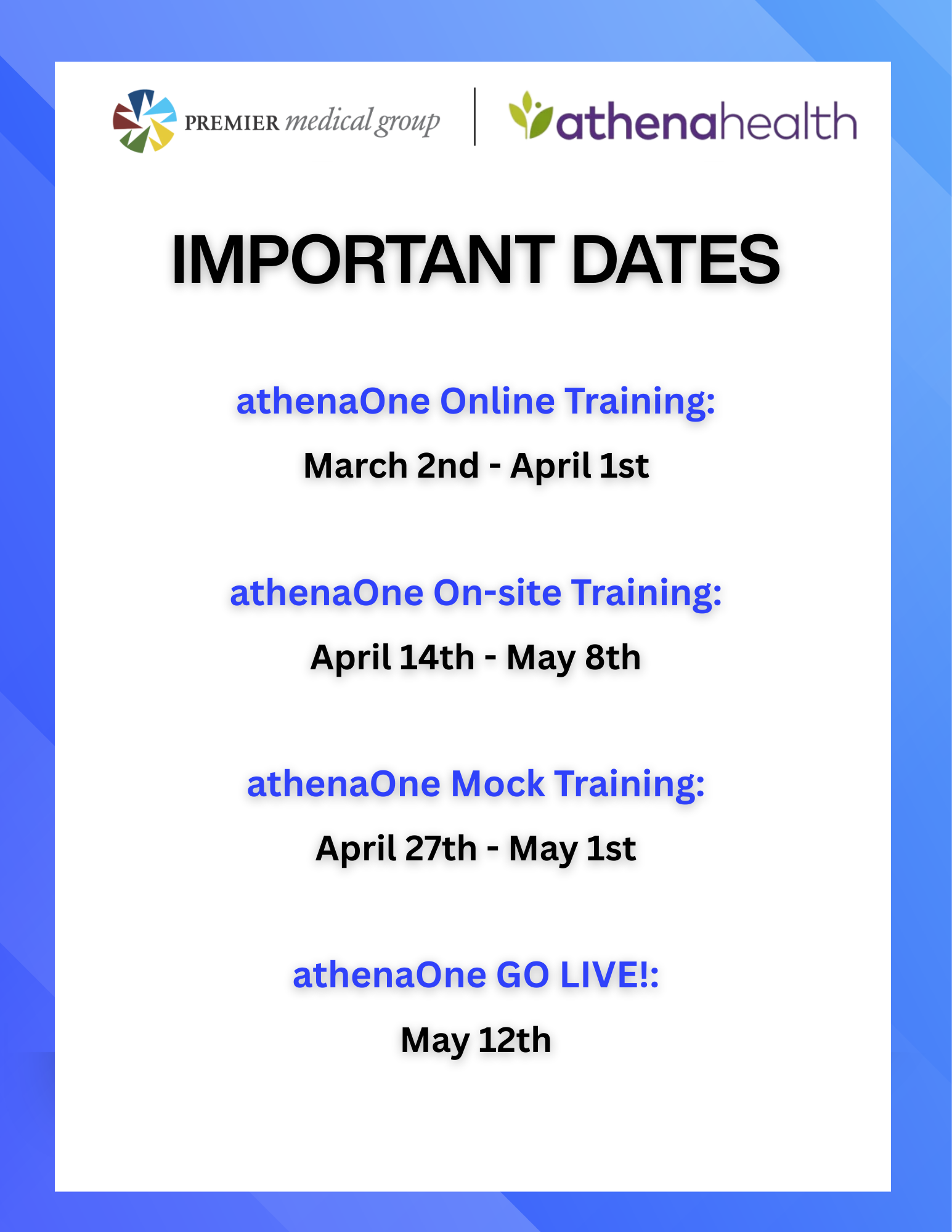
IMPORTANT DATES
Click below for important dates to remember!
WORKFLOW QUICK LINKS
Workflow question or unsure how to complete a task?
FAQ'S
Answers to commonly asked AthenaOne questions.
QUESTIONS?
Ask your question to the Project Beacon team.
